
Pdf Store App With Gemini
Writing PDF Store App With Gemini
TL;DR: A PDF store app was developed using Gemini. Try it out here: https://pdf-reader-app-latest.onrender.com/, or scroll down to see screenshots.
Motivation
The project was motivated by a search for an app that allows for the aggregation of pdfs and annotate them. A solution was eventually found one. However, this presented an opportunity to give Gemini a try. The goal was less to develop a rigorous agent setup, but see how far an out of the box agent cli could go. Gemini demonstrated an impressive ability to kick start an MVP and enable a focus on the interaction with the product.
The process began by installing the Gemini CLI, creating an empty folder, and typing 6 letters:
$ gemini
Here are the highlights of the 1-2 hour interaction spread over 3 days:
Day 1: From Scratch (~30 min)
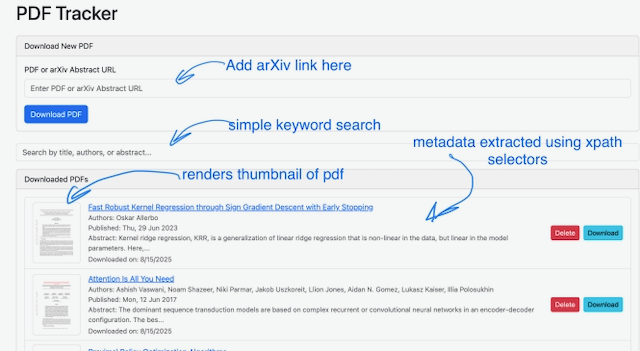
- Prompt: ‘Write a pdf uploader and viewer app.’ It created one that accepts pdf links, and lists previously uploaded files. Clicking on them opens up a pdf viewer.
- Have it take an arXiv abstract link (ex: https://arxiv.org/abs/2210.07897) and extract metadata and download the associated pdf. It was also provided with these xpath selectors here to extract metadata. ArXiv links can now be posted.
- Add keyword search enabling easy and simple search for a paper.
- Render an image thumbnail of the pdf and add it to the list items
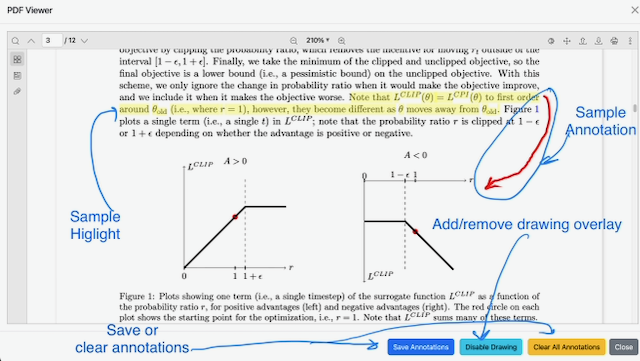
- Add highlighting to the pdf
After an iterative prompting process and in between moving on to other things, a working app was established that runs locally by running backend and frontend separately. The experience resembled working with and checking in on a very knowledgeable colleague 1. Very promising.
Day 2: Add a feature to Existing App (~15-20 min)
- Add the ability to add scribble annotations to the pdf as a drawing overlaid on top of the pdf
Took a few tries and the feature isn’t great (scribbles don’t follow page), but serves as a good MVP for future iteration.
Day 3: Prepare for Deployment (~5min)
- Add a dockerfile to allow for the deployment of the app.
Gemini both wrote a Dockerfile and had the backend serve the frontend to make it easier to deploy.
Day 4 (No Gemini): Manually Deploy to Render (~30 min)
Quick searches suggested Render. The docker image was tagged and uploaded to dockerhub. Deploying the image failed on Render because Gemini had hard-coded some urls which worked locally but did not work in docker. These were subsequently updated.
These were more or less trivial path updates, for example, the path to the compiled frontend files was:
app.mount("/static", StaticFiles(directory="/dist"), name="static")
but should have been:
app.mount("/static", StaticFiles(directory="/app/frontend/dist"), name="static")
as the Dockerfile was copying it there:
COPY --from=frontend-builder /app/frontend/dist ./frontend/dist
The outcome
The app is deployed live at https://pdf-reader-app-latest.onrender.com/. Try it out. It’s still barebones, but for very little time commitment, it represents a solid foundation.
NOTE: It will take about a minute to load and may not work if there is high traffic; it utilizes a free tier quota.
The app currently only has two views, list view and pdf view. If the app does not render, here is the list view (main page) of the app:
And finally, the pdf view:
Discussion
During this interaction, the majority of time was dedicated to thinking about how to get the product working. Historically, more time would have been devoted towards development (reading documentation, searching libraries, writing code). Time was still required for debugging (read console log output, send to Gemini, or in a small number of cases, search and fix it manually).
Several other observations are worth highlighting:
- Gemini is a software overengineer: Gemini will sometimes choose a solution more complex than needed. For example, initially when requested to add highlighting, it wrote its own custom tool. It also kept making mistakes, getting the coordinate conversions wrong, and calling methods for converting them that don’t exist. Since it was surprising that nothing existed, a simple search revealed this plugin. The agent was then instructed to try to use it and it eventually did (significantly simplifying the UI work)
- Do not give Gemini git access (or access to anything that is not backed up, really): Gemini sometimes made a bad change and wanted to commit it over an uncommitted working change. Access was restricted, and changes were committed only when verified.
- Be specific on the product goal, but loose on the implementation details: This is counter to what many people suggest and is generally good for apps that are past the MVP stage and want a specific implementation. However, for MVP’s, you generally don’t know what you don’t know. This allows Gemini to provide creative feedback by being vague where the implementation matters less for the intended goal. For example, regarding the drawing feature, the interaction method was left unspecified (should there be a toggle button etc). This let Gemini suggest the likely most common and reasonable option which proved to be a reasonable choice.
- Run the server and test it yourself During prototyping, requirements are often fluid. It is advisable against letting Gemini try to run the server. Manual execution is recommended. Often, Gemini can get stuck trying to run the server and examining more output than it needs and this can waste valuable tokens.
- Loops happen, ensure you have manual validation checkpoints: Gemini was instructed to request permission when it wanted to run the server. Requests were often refused in favor of manual execution. This precaution prevents loops. A common one has been to run the server, find a warning, introduce a bad change to fix it, see the server fail, undo it, see the warning again, then attempt to introduce the bad change again etc etc.
- Eventually do add unit tests. This will allow gemini to partially validate its changes, and avoid the need to copy-paste errors encountered. Gemini makes mistakes, as is common in development. Although not implemented here due to time constraints, this is noted because Gemini encountered simple errors that resulted in the server no longer working that a unit test could have caught earlier.
- For the simple things, it appears to follow some best practices: The Dockerfile was impressive. Gemini used staged builds, which means that the image was pretty lightweight and didn’t contain the npm toolset, which is unnecessary. The compressed size of the image is still 95MB, but this is a great start.
Conclusion
At each technological wave, work dynamics are transformed. However, one constant remains. Career growth requires remaining focused not on specific technological advances, but value creation. The focus shifts to value creation. What is the next career step that would enable greater value creation than is currently possible? Gemini can probably help make it happen.
Citation
@misc{jlhermitte2025pdfstoreapp,
  title={Writing PDF Store App With Gemini},
  author={Julien R. Lhermitte},
  year={2025},
  howpublished={\url{https://jrmlhermitte.github.io/2025/08/20/pdf-store-app-with-gemini.html}}
}
Footnotes
-
It is worth noting that such a statement does not imply agents will replace interns/junior engineers. Software engineering knowledge remains essential. Just as formal education is required, this will just be the same stepping stone interns/junior devs have always gone through except a bit more accelerated (i.e. when you master the foundations, you can build a larger project much quicker). In fact, this will likely accelerate careers significantly! ↩
-
Warning: the code isn’t the prettiest. Edits were avoided to preserve what a Gemini project looks like today. ↩